
The Duplicator copies an item you already own. Choose an item whose trigger your build hits often, and think about which item slot the copy will take. Before you plan around a doubled effect, confirm in the combat preview that both copies actually stack. If your inventory is full, the game lets you confirm leaving an item behind, a fix added in demo patch 0.0.4188.
What the Duplicator does
The Duplicator is one of the encounters on GrimKeep's branching map. DevLog #10, published on November 13, 2026, describes it as an item-copying statue. You choose an item you own, and it gives you a copy.
That makes it one of the simplest encounters to understand. You do not risk the item, as you do at the Ritual. You do not lose items, as you do when fusing at the Crucible.
The trade-off is space. A copy takes up an item slot like any other item. Plan where it will go before you take the node.
How to find it on the map
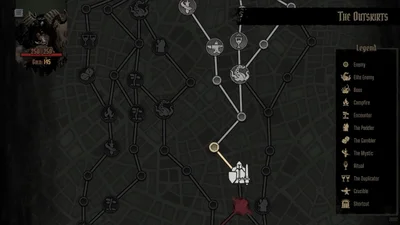
The Outskirts map marks the Duplicator with two cups. The official map screenshot and the encounter art both show the symbol. Look for it in the map legend.
Do not confuse it with the Ritual, which is marked with a single decorated cup. The two symbols are similar. Check the legend if you are unsure which is which.
When you see the Duplicator ahead, check your inventory before you choose that path. Knowing what you would copy helps you decide whether the node is worth it. If nothing in your bag is worth doubling, another path may serve you better.
Which item to copy
Choose an item whose trigger your current build hits often. A copy of an item that fires every turn can add value every turn. A copy of an item that rarely fires adds little.
Items that add Mult, Defense, or healing are good candidates when you trigger them reliably. Mult multiplies your whole attack, Defense keeps you alive, and healing extends your run. A commonly triggered effect is more useful than a situational one.
Think about your hero's key items. For the Huntress, the Wolf Tooth Necklace adds one Mult per unused reroll. For the Beast, the Golden Ring adds two Mult on a Kinds combo, and the best builds guide covers how each fits.
Check that the effects stack
Copying an item does not guarantee that you get double the effect. Whether two copies stack depends on the item. The developers have not published stacking rules for individual items.
Before you plan around a doubled number, check the combat preview. If the preview shows both copies' effects, they stack. If it shows only one, the copy may not be worth its slot.
Copy restrictions and costs for individual items also have not been published. The Duplicator screen in your game shows the current rules. Read it before you choose.
Handling a full inventory
Inventory space is the main cost of the Duplicator. If your inventory is full, the copy needs somewhere to go. Community guides call out preparing for a full inventory as part of using the encounter.
In the demo, a full inventory could cause a softlock. Demo patch 0.0.4188 fixed that by adding a way to confirm leaving an item behind. You can now choose to leave an item rather than getting stuck.
Plan this before you arrive. Decide which item you would drop if your inventory is full. An item that rarely triggers is the natural one to leave behind.
When to use the Duplicator
The Duplicator is most valuable when one item is carrying your build. Doubling that item can strengthen every fight that follows. It works best once you have found a trigger you hit reliably.
Early in a run, you may not have an item worth copying yet. Compare the Duplicator with other nodes on your route. A shop or another encounter may help more at that stage.
If your health is low, a recovery stop may matter more than any copy. The campfire options guide explains how to weigh recovery against encounters. Pick the path that solves your biggest problem.
A quick checklist
Use these questions before you take the Duplicator. They help you get the most from the copy. Adjust them to your build.
- Which item do I trigger most? That is usually the best item to copy.
- Will the effects stack? Check the combat preview after you copy it.
- Do I have space? If your inventory is full, decide which item to leave behind.
- Is this the best node? Compare it with recovery, shops, and other encounters on your route.
The Duplicator and other item encounters
The Duplicator, the Crucible, and the Ritual all change your items in different ways. The Duplicator adds a copy, the Crucible fuses two items into one, and the Ritual adds an ability. Each one suits a different situation.
You can use more than one of them in a single run. Decide which one fits your build each time you reach a fork. Check each result in the combat preview before you plan around it.
Duplicator tips for each hero
The Beast's build rewards matching faces. The Wide Hat multiplies Combo Points from Kinds combos by four, and the Golden Ring adds two Mult on a Kinds combo. If you hit Kinds every turn, one of those items is a natural candidate to copy.
The Huntress builds around saved rerolls. The Wolf Tooth Necklace adds Mult for each unused reroll, and the Flower Crown offers healing tied to unused rerolls. A Huntress who saves rerolls every turn gets steady value from either one.
The Feral rewards sixes. Feral Power adds one Mult per six, and the Zweihander adds 30 Dice Points per six. If your bag rolls sixes reliably, the Zweihander is worth a look at the Duplicator.
For any hero, the rule is the same. Copy the item that fires most often in your current build. Then confirm in the preview that both copies count.
Common Duplicator mistakes
The most common mistake is copying an item you rarely trigger. The copy takes a slot but adds little. Always pick an item your build fires often.
The second mistake is assuming the copy doubles the effect. Not every item stacks, and the stacking rules are not published. Confirm it in the combat preview first.
Quick answers
What does the Duplicator copy? It copies an item you already own. The developer describes it as an item-copying statue. You pick the item to copy.
What if my inventory is full? Demo patch 0.0.4188 added a way to confirm leaving an item behind. That fixed a softlock that could happen with a full inventory. Decide in advance which item you would drop.